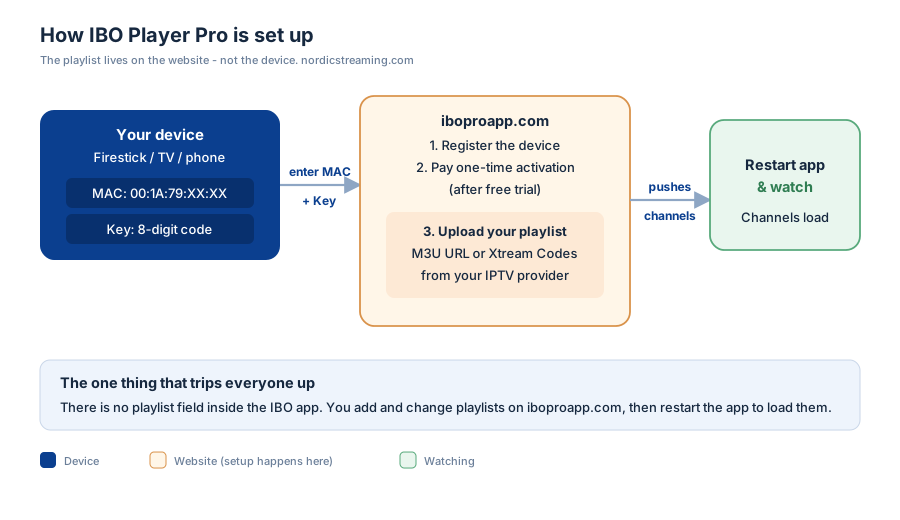
IBO Player Pro works differently from every other IPTV app, and that one difference is why most people get stuck. You do not load your channels on the device. Instead, the app shows you a MAC address and a Key, you enter those on the IBO website, upload your playlist there once, and the app pulls everything down. Miss that detail and you will sit staring at an empty player wondering what went wrong.
This guide covers the whole thing properly: installing on every device, the website activation step nobody explains clearly, uploading your playlist, and fixing the handful of things that actually go wrong.
What IBO Player Pro actually is (and what it is not)
IBO Player Pro is a player, not a service. The app has no channels of its own — it is an empty shell that plays whatever playlist you point it at. That is deliberate, and it is why the app is tiny, fast, and works the same on a Firestick as on a Samsung TV.
The trade-off is the setup model. Most apps let you type your playlist URL straight into the app. IBO does the opposite: the device gets registered on IBO’s website first, and the playlist lives there. Once you understand that, the rest is easy. Fight it, and nothing makes sense.
Step 1: Install the app on your device
The app is on the official stores for most platforms. Install it, open it once, and leave it on the screen showing your MAC address — you will need that number in a moment.
Android and Android TV boxes
Open the Google Play Store, search IBO Player Pro and install. Done — the store handles everything.
iPhone, iPad and Apple TV
On the App Store the listing is usually IBO Pro Player (words flipped). Same app, same process. Install and open.
Samsung and LG Smart TVs
Open your TV’s app store — the Samsung Apps store on Tizen, or Content Store on LG webOS — search for it and install. If it is not listed in your region, the Firestick route below is the reliable fallback.
Firestick and Fire TV
IBO is not in Amazon’s own store, so you sideload it with the Downloader app:
- Install Downloader from the Amazon Appstore
- In Settings → My Fire TV → Developer Options, turn on Install Unknown Apps for Downloader
- Open Downloader and enter the official download link (from iboproapp.com)
- Let it download, then install and open
Only ever use the official link. Sideloaded APKs from random sites are how people end up with a tampered build.
Step 2: Register your device on the IBO website
This is the step that trips everyone, so slow down here. Open the app and you will see two things on screen: a MAC address and a Key. Leave the TV on that screen.
On a phone or computer, go to iboproapp.com and enter that MAC address and Key exactly as shown. This links your specific device to your IBO account. There is a small one-time activation fee for the player itself — that is separate from your IPTV subscription, and it is a one-off, not a monthly charge. A short free trial period usually applies first so you can confirm everything works before paying.
Step 3: Upload your playlist
Still on the IBO website, with your device registered, add your playlist. You have two ways in, exactly as with most players:
- M3U URL — paste the playlist URL your IPTV provider gave you. Keep it as a URL so the channel list stays up to date.
- Xtream Codes — enter the server URL, username and password if that is what your provider issued instead.
Give it a name, save, and that is the setup finished. The playlist now lives on your IBO account, tied to that device’s MAC address.
Step 4: Reload the app and watch
Back on the device, close the app completely and reopen it. On the fresh start it fetches the playlist you just uploaded, and your channels, movies and guide appear. As with any player, the first load of a large playlist takes a minute; after that it is instant.
Adding more channels later, or switching providers, is done on the website — never on the device. That catches people out too: they hunt through the app’s settings for a playlist field that does not exist.
IBO Player Pro not working? The usual suspects
Almost every problem is one of these, in order of how often it is the answer:
| Symptom | What it means | Fix |
|---|---|---|
| App opens but no channels | Playlist not uploaded, or app not reloaded after upload | Upload on the website, then fully restart the app |
| “Device not activated” | MAC/Key not registered, or trial expired | Register on iboproapp.com and complete the one-time activation |
| Channels listed, nothing plays | Provider line expired or connection limit reached | Check your IPTV subscription is active |
| Buffering or black screen | Bandwidth or a decoding mismatch | Use Ethernet; on weak devices lower the stream quality |
| Is IBO Pro Player down today? | Occasionally the activation site has an outage | Wait and retry; the app itself keeps playing an already-loaded playlist |
If a stream stalls constantly no matter what you try, the app is rarely the cause — see our guide on fixing IPTV playback problems, which applies to any player.
What it costs
Two separate things get confused here, so let us be clear:
- The player — a small one-time activation fee per device, paid once on the IBO website. Not a subscription.
- The IPTV service — your channels come from a provider, billed separately by them. IBO does not sell channels.
So “how much is IBO Player Pro per month” has a slightly awkward answer: the player itself is not monthly at all. Your monthly cost is whatever your IPTV provider charges.
Why people pick this player
It earns its following for a few honest reasons: it is light and quick even on cheap hardware, it looks clean, it runs the same across every platform, and the one-time fee means no recurring cost for the player. Managing everything on the website also means you can update a playlist across devices without touching each TV.
The flip side is exactly what this guide exists for — the website-first setup is unfamiliar, and the app gives you almost no hand-holding. Once it clicks, though, it is one of the most reliable players going. Pair it with a provider that has stable servers and honest connection limits and you rarely think about it again; our IPTV service reviews cover what to look for.
Frequently asked questions
How do I activate IBO Player Pro?
Open the app to see your device’s MAC address and Key, then go to iboproapp.com on a phone or computer and enter both. This registers the device. There is a one-time activation fee for the player, usually after a short free trial. Activation is per device, not per account.
How do I add a playlist to IBO Player Pro?
You add it on the IBO website, not in the app. After registering your device on iboproapp.com, paste your M3U URL or Xtream Codes login there, save, then restart the app on your device to load the channels. The app has no playlist field of its own by design.
Where do I find the MAC address in the IBO app?
It is shown on the app’s home screen the moment you open it, alongside the Key. You enter both on the IBO website to link the device. Leave the app on that screen while you register.
How much does IBO Player Pro cost per month?
The player itself is not a monthly cost — it is a single one-time activation fee per device. Your only recurring charge is your separate IPTV subscription, billed by your provider. IBO does not supply channels.
Is IBO Player Pro on Firestick?
Yes, but it is not in Amazon’s store, so you sideload it with the Downloader app using the official link from iboproapp.com. Enable “Install Unknown Apps” for Downloader first, then install as normal.
Why is my IBO player not working?
The most common reasons are an unregistered device (complete activation on the website), a playlist that was never uploaded or the app not restarted after upload, or an expired IPTV line. Work through those three before anything else.
The short version
Setting up IBO Player Pro is four moves, and only the order surprises people: install the app, register the device’s MAC address and Key on iboproapp.com, upload your playlist on that website, then restart the app to load it. The playlist lives on the website, not the device — get that one idea and the whole thing falls into place in under ten minutes.
Related guides: IPTV Smarters Pro setup, Kodi IPTV setup, and installing an IPTV player on Firestick.