
A VPN for IPTV does two jobs, and only one of them is the one people expect. The obvious one is privacy — your provider and network see encrypted traffic instead of what you are watching. The less obvious one, and the reason most people actually notice a difference, is that it stops your ISP throttling your stream. If your picture holds up fine at 2pm and falls apart every evening, throttling is usually why, and a VPN is the fastest way to prove it.
This guide covers when you genuinely need a VPN, when you do not, how to pick one that will not make buffering worse, and how to set it up on the device you actually watch on. No fear-mongering, no fake “you’ll get caught” pressure — just what the tool does and how to use it well.
Do you need a VPN for IPTV?
Honest answer: not always. Skip the marketing and it comes down to three real reasons, and if none apply to you, you do not need one.
- Your ISP throttles streaming. This is the big one. Many providers quietly slow specific traffic at peak times. If evenings buffer and mornings do not, a VPN often fixes it outright by hiding the traffic type.
- You want privacy on your connection. A VPN encrypts what you do, so your network operator sees an encrypted tunnel rather than your activity. Normal, mainstream, and the same reason people use one for banking on public Wi-Fi.
- You are on a restricted or shared network. Some workplace, campus, or hotel networks block streaming wholesale. A VPN routes around that.
If your stream is rock-solid at all hours on your home connection and privacy is not a concern for you, a VPN adds encryption overhead for no real gain. Use the tool where it earns its keep.
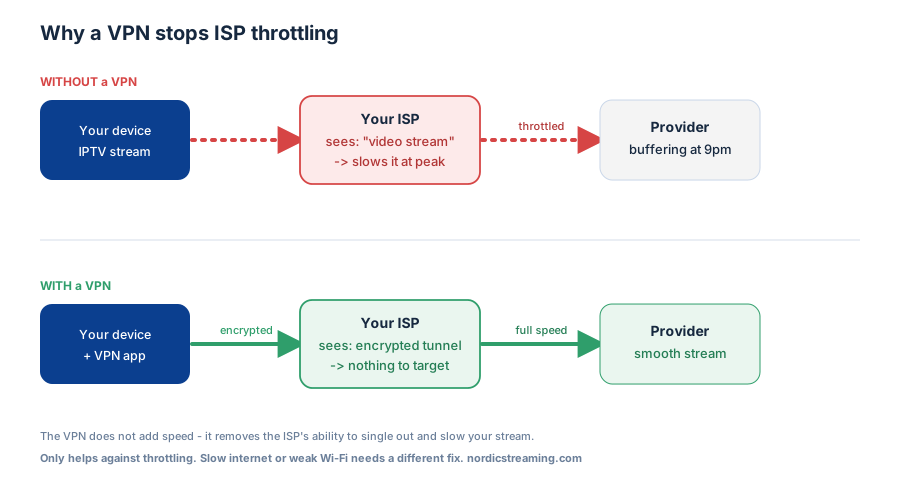
How to tell if your ISP is throttling you
Before paying for anything, prove the problem. This takes five minutes and saves you buying a VPN you do not need.
- Run a speed test at a good time and a bad time. Test at 2pm and again at 9pm on the device that stutters. A big evening drop points at peak-time throttling.
- Test the stream through a VPN once. Most VPNs have a free trial or a money-back window. If a stream that stalls every night plays cleanly through the VPN, that is throttling confirmed — the only variable you changed was hiding the traffic type.
- Check other streaming apps. If Netflix and YouTube also degrade at the same hours, it is your connection or peak-time throttling, not your IPTV setup.
That second test is the whole diagnosis. If the VPN makes no difference, your problem is bandwidth or Wi-Fi, and no VPN will fix that — see the connection fixes further down.
What to look for in a VPN for IPTV
Streaming is demanding in a way that ordinary browsing is not, so the usual “which VPN is cheapest” advice misses the point. Four things actually matter:
| What matters | Why | What to avoid |
|---|---|---|
| Speed | A VPN adds overhead; a slow one turns light buffering into constant buffering | Free VPNs — almost always too slow and often bandwidth-capped |
| Nearby servers | Every extra mile adds latency; a server in or near your country is fastest | Connecting to a far-off country “to be safe” — it just adds lag |
| A native TV/Firestick app | You want it on the device you watch on, not just your laptop | Providers with no app for your streaming device |
| No bandwidth limits | Streaming burns data fast; caps kill it mid-film | Anything advertising a monthly data allowance |
Notice speed and a nearby server matter more than the number of countries a VPN offers. For IPTV you are not trying to appear on the other side of the world — you are hiding the traffic type from your own ISP, which works best with a fast server close to home.
How to set up a VPN for IPTV
The process is the same across providers; only the app’s look changes.
On Firestick and Android TV
- Install your VPN’s app from the device’s app store (most major VPNs have a native Firestick app)
- Sign in and connect to a server in or near your own country
- Leave it connected, then open your IPTV app as normal
That is genuinely it — the VPN runs in the background and every app on the device goes through it.
On a phone, tablet, or computer
Same idea: install the app, connect to a nearby server, then open your player. On mobile you can set most VPNs to connect automatically whenever you open your streaming app.
On a device with no VPN app
Some Smart TVs and boxes cannot run a VPN directly. The fix is to install the VPN on your router instead — then every device in the house is covered, TVs included, with no per-device setup. Most VPN sites have a router guide for this.
The cheaper fix people forget: change your DNS
Not every problem needs a VPN. If your ISP is interfering at the DNS level rather than throttling bandwidth, simply changing your DNS resolver fixes it for free, with no encryption overhead and no speed cost.
- Google Public DNS: 8.8.8.8 and 8.8.4.4
- Cloudflare: 1.1.1.1 and 1.0.0.1
Set these on your router so every device benefits. Try DNS first — if it solves the problem, you have saved yourself a subscription. If it does not, a VPN is the next step up.
When a VPN will not help
Being straight with you: a VPN is not magic, and pointing one at the wrong problem just adds latency. It will not help when:
- Your internet is simply too slow. If you cannot hit 25 Mbps for 4K without a VPN, you will not hit it with one. A VPN only ever costs a little speed; it never adds any.
- Your Wi-Fi is the bottleneck. Distance from the router and 2.4 GHz congestion cause more buffering than any ISP. Ethernet or 5 GHz fixes more streams than a VPN does.
- Your provider’s servers are overloaded. If the source is struggling, encrypting your side of the connection changes nothing. That is a provider problem.
If a stream stalls constantly regardless of VPN, work through the device and connection fixes in our guide on fixing IPTV playback problems — the cause is almost always local.
A note on staying legal
A VPN is a privacy and performance tool, not a licence to do anything. It is completely legal to use, and so is streaming — provided the service you subscribe to is legitimate and licensed. Use a VPN the way you would for online banking: to keep your connection private and stable. Pair it with a proper provider and you get a clean, fast, private setup with nothing to worry about. Our IPTV service reviews cover what a legitimate provider looks like.
Frequently asked questions
Do I need a VPN for IPTV?
Only if one of three things is true: your ISP throttles streaming at peak times, you want your connection private, or you are on a network that blocks streaming. If your stream is stable all day and privacy is not a concern, a VPN is optional. The quickest test is to try one during a free trial — if evening buffering disappears, throttling was the cause.
What is the best VPN for IPTV?
The best VPN for IPTV is whichever is fastest on a server near you, has a native app for your streaming device, and places no cap on bandwidth. Speed and a nearby server matter far more than the total number of countries offered. Avoid free VPNs — they are almost always too slow and data-limited for smooth streaming.
Will a VPN stop my IPTV buffering?
It will if the buffering is caused by ISP throttling — hiding the traffic type gives the throttling nothing to target. It will not help if the cause is slow internet, weak Wi-Fi, or an overloaded provider server, because a VPN only ever costs a little speed rather than adding any. Diagnose first by testing a stream with and without the VPN.
How do I stop my ISP throttling my streams?
Two options. A VPN encrypts your traffic so the ISP cannot identify it as video and cannot single it out for slowing. Cheaper first: change your DNS to Google or Cloudflare, which fixes DNS-level interference for free. Try DNS first; move to a VPN if it does not resolve the evening slowdowns.
Can I use a free VPN for IPTV?
You can, but it rarely works well. Free VPNs are typically too slow for smooth streaming and often cap your monthly data, which streaming burns through quickly. If a VPN is worth using for IPTV at all, it is worth using a fast paid one — otherwise you are trading one buffering problem for another.
Does a VPN slow down IPTV?
Slightly, always — encryption has a small cost. But on a fast VPN with a nearby server the loss is tiny, and if it removes ISP throttling the net result is a much better stream. The trick is connecting to a close server, not a distant one.
The short version
A VPN for IPTV is worth it for exactly two reasons: privacy, and stopping ISP throttling that wrecks your evening streams. Prove throttling first with a simple with-and-without test, try a free DNS change before you pay for anything, and if you do get a VPN, pick a fast one with a nearby server and a native app for your device. Used that way it is one of the most reliable upgrades to a streaming setup. Point it at slow internet or weak Wi-Fi, though, and it fixes nothing.
Related guides: fixing IPTV playback problems, Kodi IPTV setup, and installing an IPTV player on Firestick.